
Notes
Tasks
Partly today
DONE Share the document for the embedded dashboards for different customers
- My typical workflow:
- Tell gemini to design a basic UI based on customer’s branding guide.
- Tell ampcode implements it, using basic backend/frontend architecture:
App.jsx(react) for frontend andserver.js(express) for backend. - Holistics sets frame-ancestors ‘self’ https: on its portal, which blocks iframes loaded from http://localhost because it only allows HTTPS origins. The browser refused to render the Holistics iframe with the error: “Framing ‘https://us.holistics.io/' violates the following Content Security Policy directive”.
- The solution was to serve the local dev server over HTTPS using @vitejs/plugin-basic-ssl, so https://localhost:5173 satisfies the CSP policy.
- How to I present how to set up embed portals to customers?
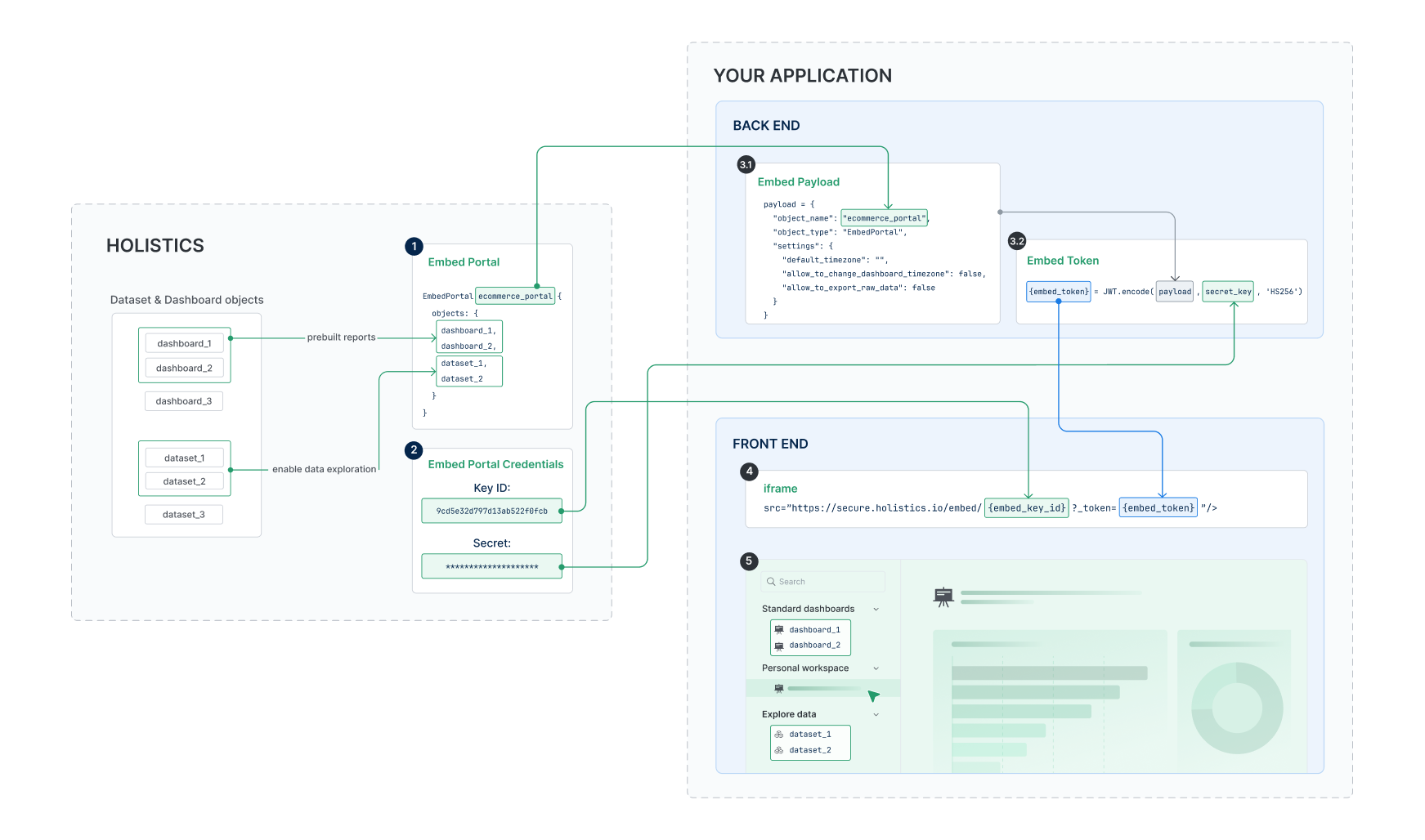
- Explain high-level mechanism
logseq.order-list-type:: number
- https://media.holistics.io/347e2a6d-embed-portal-getting-started.png logseq.order-list-type:: number
- In Holistics, show:
logseq.order-list-type:: number
- Embed portal in development and how to add dataset/dashboard objects.
logseq.order-list-type:: number
- Firstly just develop model/dataset/dashboard as usual. logseq.order-list-type:: number
- Then put whichever object they want to externally embed into their app. logseq.order-list-type:: number
- Credentials location. logseq.order-list-type:: number
- Embed portal in development and how to add dataset/dashboard objects.
logseq.order-list-type:: number
- Backend side:
logseq.order-list-type:: number
- Step 1, generate payload, which is basically a JSON object to configure how and which each customer will see. logseq.order-list-type:: number
- Present parameter reference. logseq.order-list-type:: number
- Sign payload with JWT token using the secret. logseq.order-list-type:: number
- Frontend side:
logseq.order-list-type:: number
- Render iframe based on the signed JWT token. logseq.order-list-type:: number
- Explain high-level mechanism
logseq.order-list-type:: number
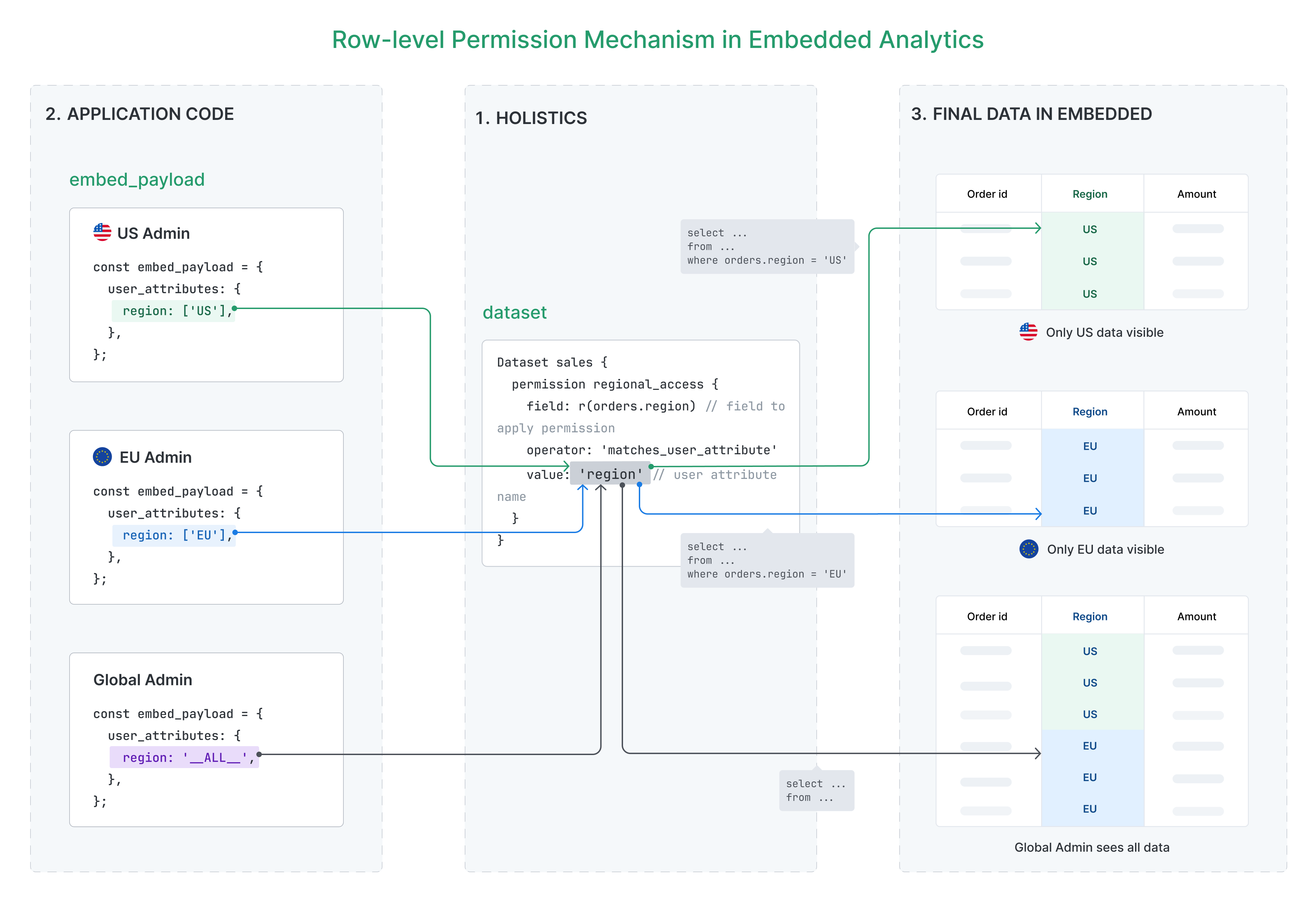
- Then ask the question: how to restrict data access for each customer? Answer: we come to row-level permission
- High-level mechanism logseq.order-list-type:: number
- Add user attributes. logseq.order-list-type:: number
- Add permission as code into dataset.
logseq.order-list-type:: number
- Explain the single entry point for row-level permission is dataset. Once add into dataset, every widgets of a dashboard query from that dataset will be restricted by RLP. logseq.order-list-type:: number
- If a dashboard is not restricted, it’s because that dashboard is using another dataset. logseq.order-list-type:: number
- See preview in development embed portal. logseq.order-list-type:: number
- Configure payload to include that user attribute. logseq.order-list-type:: number
- My typical workflow:
Done
DONE Ask squad modeling why the user 112390 does not exist
Answer: hard-deleted users: shareable link and embedded link => pseudo users are deleted when their respective links are deleted.
Affect audit log? No. As long as those data in
activitiestable.Although anh Dat thinks not enough.
DONE Debrief onboarding call 2 with Basata
DONE Review what Hieu wrote, help him communicate with growth team (2 items)
Status: after the call with Quinn (ReadAI), I am waiting for Hieu to complete the document of exchange rate to review.